Your website might look fine at a glance. Pages load, forms submit, and occasionally you receive an enquiry. But the world around your website is changing. Today, people still search on Google, but they increasingly rely on AI tools like ChatGPT, Gemini, and Copilot to answer questions such as:
- “Which company can help me with [service] in [city]?”
- “Who is a trusted [niche] provider near me?”
If your online presence is not ready for this shift, you will slowly lose leads without any clear signal. This article gives you a simple checklist you can use as a business owner, even if you are not technical.
1. Speed and performance – does your site feel slow?
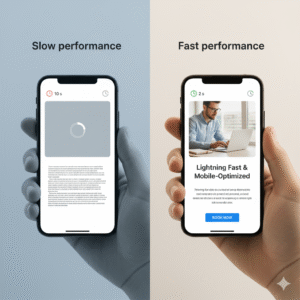
You can do the first check without any tool.
- Open your website on your phone.
- Use mobile data instead of Wi-Fi.
- Tap through 4 to 5 pages.
- Submit your main form.
Ask yourself:
- Do pages open within 2 to 3 seconds?
- Do large images appear slowly?
- Does the layout jump around while the page loads?
If it feels slow to you, it will feel worse for a new visitor who does not know you.
Slow sites hurt you in three ways:
- People leave before they read anything.
- Search engines prefer faster sites.
- AI systems that use web data also learn from speed and stability signals.
You do not need to know every detail of caching or compression. You only need to make speed a clear requirement for whoever maintains your site.
2. Mobile experience – can a thumb handle your site?
Most traffic is now on mobile. A desktop-only mindset is already outdated.
Do a simple thumb test:
- Can you tap menu items and buttons easily with one hand?
- Is the text readable without zoom?
- Are important buttons (call, WhatsApp, book now, contact) visible without scrolling too much?
- When you scroll, does anything feel broken or messy?
If visitors have to pinch, zoom, guess, or scroll in random ways, they will not fight with your site. They will close it and search again. Good mobile use is not just a “design trend”. It is a basic factor for both search ranking and how AI tools judge the quality of your site.
3. Clear next step – is it obvious what visitors should do?
Many sites look nice, but they do not guide the visitor.
Pick your main pages, such as:
- Home
- Important service pages
- Pricing
- Contact
For each one, check three things:
- In the first 3 seconds, is it clear what this page is about?
- Is it clear who this is for?
- Is there one clear main action?
Examples of clear actions:
- For a restaurant: “Book a table”.
- For a service firm: “Request a quote”.
- For a SaaS: “Start a free trial” or “Schedule a demo”.
- For a local business: “Call now” or “Chat on WhatsApp”.
Your website should not make visitors think hard. If people need to “figure out” how to contact you, the site is costing you leads.
4. Trust signals – does your site feel real and current?
People do not trust websites blindly any more. They look for proof.
Check your site for these items:
- Real photos of your team, office, or work (not only stock photos).
- Client testimonials or ratings. As per the latest survey by Good Firms, 71% experts say even a single positive review has the capacity to close the gap between customer experience and customer satisfaction. Find detailed survey here.
- Logos of brands you have worked with, if allowed.
- Clear “About us” section with human tone, not only buzzwords.
- Address, phone, and company details in the footer or contact page.
- Working links to social profiles that show recent activity.
Trust does not come from “nice design” alone. It comes from simple signs that show you are real, active, and accountable. This matters for AI also. When someone asks an AI tool for local providers, the tool looks at a mix of website content, reviews, and online signals. A weak or silent brand is less likely to be suggested.
5. Content accuracy – is your site wrong without you knowing?
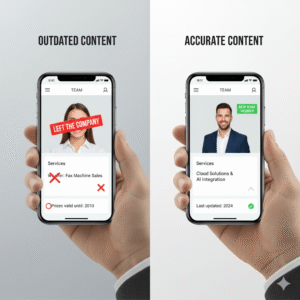
Old content can quietly harm you.
Common issues:
- Old pricing visible on the site.
- Services that you no longer offer still listed.
- Team members who left long ago still shown as key staff.
- Old offers or events visible on banners.
- Outdated locations or phone numbers.
This harms you in two ways:
- A human visitor sees it and loses trust.
- AI systems read it and repeat wrong info about your business.
For example, maybe your site still says “We serve only Gujarat”, but you now work across India or globally. AI tools that use your site as a source may now speak about you in a limited way.
Plan a simple content review at least once or twice a year:
- Services
- Prices or “starting from” labels
- Locations
- Team page
- About page
- Key FAQ or blog posts that mention dates or time-based details
6. SEO and AIEO – ready for both search and AI tools
Classic SEO is still important. You want to appear when someone types:
- “Best [service] company in [city]”
- “[niche] website developer”
- “[industry] software development partner”
Basic SEO hygiene includes:
- One clear topic per page (one service, one intent).
- Page title and meta description that explain that topic in plain language.
- Headings that match what people actually search for.
- Some useful content that answers real questions from your buyers.
Now there is an extra layer: AIEO (AI Engine Optimization)
You can think of AIEO in simple terms:
“Make it easy for AI tools like ChatGPT and Gemini to understand what you do,
who you serve, and when they should mention your brand.”
You do not need complex tricks. Instead, focus on a few basics.
6.1 Use clear, simple language
AI tools read and learn from huge amounts of content. If your copy is full of vague claims and buzzwords, it is harder to understand.
Write in the way your ideal client would talk:
- “We build booking websites for clinics in the US.”
- We help restaurants in Houston get more table bookings through better websites.”
This kind of sentence is easy for both humans and AI to work with.
6.2 Structure your content well
Make it easy to see what you offer.
- Separate pages for each service.
- Separate pages or clear sections for key locations.
- FAQ sections that answer focused questions.
This helps Google index your content, and it helps AI tools pick the right sentences when giving answers.
6.3 Keep your business details consistent
Your name, address, phone, and simple company description should be the same on:
- Your website
- Google Business Profile
- Important directories or listings
AI tools cross-check these data points to confirm that you are a real, stable business.
6.4 Share helpful content, not only sales copy
Blog posts, guides, and FAQs that solve real problems are more likely to be used as reference by AI systems.
For example:
- “How to know if your business website needs an update this year”
- “5 quick checks before you send your website live”
When you write in a clean, honest way, you increase the chance that both search engines and AI assistants treat your content as useful.
7. Data, tracking, and simple automation
If you do not measure, you are guessing.
At a minimum, your setup for 2026 should include:
- Analytics tool such as GA4 or a simple privacy friendly alternative.
- Event tracking for key actions like form submits, clicks on phone numbers, WhatsApp clicks, bookings, and orders.
- A basic dashboard or monthly summary of:
- Total visitors
- Leads or key actions
- Top pages that bring those leads
On top of that, add simple automation:
- Form submissions go into a CRM or at least a shared sheet, not only to email.
- Auto-response email or WhatsApp message that confirms “we received your enquiry”.
- Basic follow-up steps, for example a reminder if you have not replied within 24 hours.
This is not “complex AI”. It is basic hygiene that makes every future marketing action more effective.
8. Using AI inside your website in a useful way
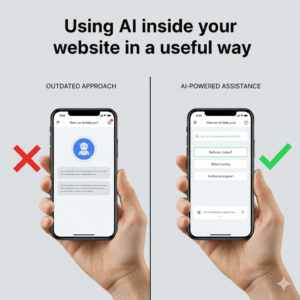
Many businesses feel pressure to “add AI” just to look modern. That alone does not help.
Start with use cases that help visitors and your team:
- A smart FAQ section where common questions have clear answers, and an AI helper can suggest related answers from your content.
- Drafting support replies with AI, which your team then reviews and sends.
- Tools that help you write or update content faster, based on your own tone and offers.
- Simple lead qualification on forms, where AI helps tag and group leads for your sales team.
The goal is not to impress visitors with a chatbot widget. The goal is to help people get answers faster and help your team close work in less time.
9. Quick self check – is your website really ready for 2026?
Go back through the sections and mark each one as:
- Yes, this is fine.
- No, this needs work.
- Not sure.
If you have more than three “no” or “not sure” answers, your website is not ready for 2026 yet. That does not always mean you need a full rebuild. Often you can fix things in focused steps.
A simple improvement plan can be:
- Fix speed and mobile issues.
- Make one clear action per key page.
- Clean up trust signals and old content.
- Clarify services and locations for both search and AI tools.
- Set up tracking and at least basic automation.
- Add AI where it genuinely improves the experience.
What to do next
If this checklist made you think “I know we are behind, but I do not know where to start”, you are not alone.
At Zluck Solutions, we help business owners:
- Review their current website with a plain language report.
- Prioritize fixes that can make a real impact in weeks, not years.
- Plan both SEO and AIEO steps so that you are visible for Google and for tools like ChatGPT and Gemini.
If you want a short, honest view of your website’s 2026 readiness, you can:
- Send us your website URL
- Tell us your main goal (more leads, more bookings, better trust, etc.)
We will share a clear plan of what to fix first, so your website does not stay stuck in 2026 while your clients and their AI assistants move ahead.
FAQs: Website readiness for 2026 and AIEO
What does it mean for a website to be ready for 2026?
A website that is ready for 2026 loads fast, works well on mobile, and has clear actions for visitors. It shows real proof of trust, such as reviews and case studies, and has up to date content. It is also easy for both search engines and AI tools like ChatGPT and Gemini to understand who you are, what you offer, and who you serve.
How do I know if my website needs an update before 2026?
Check a few basic points. If your site feels slow on mobile, looks old, or does not show clear next steps for visitors, it likely needs work. Old prices, old services, or wrong contact details are also strong signals. If you are not tracking leads or you are unsure which pages bring business, then an update plan is needed.
What is AIEO and how is it different from SEO?
SEO focuses on making your website clear and useful for search engines like Google and Bing. AIEO stands for AI Engine Optimization and focuses on making your content easy for AI tools like ChatGPT, Gemini, and others to understand and use in their answers. Both use similar basics, such as clear language, good structure, and accurate data. SEO helps you rank in search results, while AIEO helps AI assistants pick and speak about your brand correctly.
Do I still need SEO if I focus on AIEO?
Yes, SEO is still important. Most users still start with a search engine when they look for products or services. AIEO builds on top of good SEO practice. If your site is fast, clear, and well structured for search, you are already part of the way towards AIEO. The goal is not to choose between SEO and AIEO, but to keep both in mind when you plan content and site changes.
How do AI tools like ChatGPT and Gemini use my website?
AI tools learn from many sources across the web. They may read your site content, your blog posts, your FAQ pages, and even your reviews and profiles on other platforms. If your site explains your services, locations, and strengths in clear terms, the AI can better understand when your business is a good match for a user’s question. If the information is old, unclear, or thin, you are less likely to be suggested.
Do I need a full redesign to be ready for 2026?
Not always. Sometimes you only need focused fixes, such as speed improvements, better mobile layout, clearer calls to action, and updated content. A full redesign makes sense if the site is very outdated, hard to maintain, or built on a weak base. A short review from a website partner can help you decide if you can improve the current site or if a fresh build is smarter.
How can a small business use AI on its website in a simple way?
Small steps are enough to start. You can use AI to help write and update content, create FAQs, or suggest email replies that your team edits before sending. On the site itself, you can add a helper for common questions, as long as it uses your real content and does not confuse visitors. You can also use AI in the backend, such as grouping leads, drafting reports, or summarizing chat history.
How often should I review my website for SEO and AIEO?
At minimum, review your site every 6 to 12 months. Check speed, mobile use, content accuracy, and main actions for visitors. Review service pages, locations, and FAQs, and update anything that is old or unclear. If you run active campaigns or rely heavily on inbound leads, a light review every quarter is better.
What are the first steps to improve AIEO for my website?
Start with simple moves:
1. Rewrite key pages in clear, plain language that matches how your customers talk.
2. Create or improve pages for each main service and, if needed, each key location.
3. Add focused FAQs that answer real questions in a direct way.
4. Make sure your business name, address, phone, and short description match across your site and main listings.
Once this base is ready, you can look at deeper steps such as structured data, content plans, and smart use of AI in your workflows.