The final major release of 2025, WordPress 6.9 hit the web on December 2, 2025.
This update – code-named “Gene” – brings a host of improvements: native collaboration tools, new content blocks, smarter editing workflows, and performance upgrades that make your website faster and more future-proof. Whether you run a personal blog, a business site, or a content-heavy platform, 6.9 has something useful for you.
In this article, we dive into what’s new – and why these changes matter.
What’s New in WordPress 6.9
🔹 Block-Level Collaboration: “Notes”
- A standout in 6.9 is the new Block-level “Notes” feature: you can now leave comments or feedback directly on individual blocks (text, images, layouts) within the editor — ideal for team collaboration, editorial review, or client feedback.
- Notes support threaded replies, resolution, and email notifications to authors — no external tools needed.
🔹 Hide / Show Blocks & Better Block Visibility Control
- Want to prepare content (e.g. seasonal promos or announcements) but not publish it yet? 6.9 lets you hide blocks from the frontend, while keeping them in the editor. Great for staging or draft-planning content.
- This avoids the need for extra plugins or duplicate draft pages — reducing clutter and complexity.
🔹 Smoother Drag-and-Drop & Improved Editing Workflow
- The block editor now supports more intuitive drag-and-drop: you get a live preview of where a block will land before you release it — useful when rearranging content, building layouts, or editing design.
- For site-builders and editors, these small usability upgrades add up, making page building faster and less error-prone.
🔹 New Built-in Blocks — Less Reliance on Plugins
- WordPress 6.9 adds several powerful blocks to the core block library — reducing the need for extra plugins.
Some of the most useful new blocks:
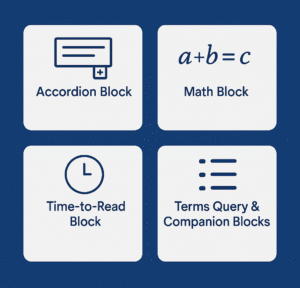
- Accordion Block — Create collapsible sections, ideal for FAQs, long content, or organised information.
- Math Block — Write mathematical equations or scientific notations using LaTeX/MathML — useful for educational/technical blogs.
- Time-to-Read Block — Show estimated reading time for posts — helpful for long-form content and improving user experience.
- Terms Query & Companion Blocks — Display taxonomy (categories/tags/custom taxonomies) lists dynamically: good for directories, magazine-style sites, or content-rich blogs.
Also, block styling and design get better — e.g. improved text-fit (text scaling), border radius presets, better control over layout — giving more design flexibility without custom CSS. WP Umbrella+1
🔹 Performance, Speed & Developer Enhancements
Behind the scenes, 6.9 brings big improvements to performance and developer tools:
- Optimized database queries, refined caching, better cron handling — meaning pages load faster and your backend runs more efficiently.
- CSS and asset loading is smarter: only needed block CSS/styles load, and unused or hidden-block CSS is skipped — improving page speed and reducing bloat.
- For developers, the release introduces new APIs (like the Abilities API, Interactivity API, Block Bindings API, etc.), paving the way for automation, integrations, and future-ready development (e.g. AI workflows).
- Template management is smarter: 6.9 improves how custom templates are handled, helping with theme switching and layout management across projects.
🎯 Why WordPress 6.9 Matters for You — Use Cases & Benefits
- Better editorial workflows & collaboration — If you work with a team (writers, editors, designers), “Notes” turns WordPress into a collaborative workspace — you don’t need external tools like Google Docs or Slack for content review.
- Cleaner layout & content control — Hide blocks, use Accordion / Time-to-Read / Terms Query etc., and craft rich, organised pages without relying on many plugins — reduces maintenance overhead and plugin conflicts.
- Improved site performance & SEO potential — Faster load times, optimized CSS/scripts, leaner asset loading — all help with user experience and search engine rankings.
- Future-proof & developer friendly — With new APIs and backend enhancements, WordPress 6.9 is ready for scalable sites, custom integrations (e.g. automation, AI), and complex workflows.
✍️ Final Thoughts
WordPress 6.9 isn’t just a minor update – it delivers meaningful enhancements across editing, collaboration, design, performance and developer capability. For bloggers, site-owners or developers, it’s a major step forward: fewer plugins, smoother editing, faster load times, and a foundation for future-proof web development.
If you need any help updating to WordPress 6.9 or would like any changes to your website based on the latest features, feel free to contact us anytime.