WordPress 7.0 is the most anticipated release of the decade. Scheduled to launch officially on April 9, 2026, it marks the definitive arrival of Gutenberg Phase 3, a long-promised era of collaboration, AI integration, and a modernized admin experience. After a turbulent 2025 that saw legal battles, contributor disruptions, and a compressed release schedule, WordPress is arriving in 2026 with renewed momentum and a milestone release that could reshape how millions of websites are built and managed.
Currently in Beta 5 testing, WordPress 7.0 is not just an incremental update. It is a foundational shift in how teams create, collaborate, and publish content on the web’s most popular content management system. In this post, we break down every major feature, what it means for users and developers, and what you should do to prepare before the official launch.
- Release Date: April 9, 2026, in WordCamp Asia 2026 Contributor Day.
Why WordPress 7.0 Is a Big Deal
To understand the significance of version 7.0, it helps to know what happened in 2025. WordPress originally planned three major releases that year. However, legal proceedings between Automattic and WP Engine disrupted the contributor pipeline significantly, since Automattic employs a large share of core contributors. The team made a deliberate decision to prioritize quality over speed, shipping only two releases (6.8 and 6.9) and pushing the major version milestone to 2026.
The result is a release that has had more development time, more testing cycles, and a clearer strategic vision than almost any version in recent memory. WordPress 7.0 arrives polished and purposeful. Here is everything that is confirmed.
WordPress 7.0 Feature Overview
- Real-Time Collaboration – Multiple users can edit a page or post simultaneously, similar to Google Docs.
- Visual Revisions – Color-coded visual comparison of page versions directly in the editor.
- WP AI Client – Native AI infrastructure layer supporting OpenAI, Google, and Anthropic providers.
- Connectors UI – Centralized dashboard under Settings > Connectors to manage all AI providers.
- New Block Types – Icons block, Breadcrumbs block, and enhanced Heading block added to core.
- Responsive Block Visibility – Hide or show individual blocks based on screen size (mobile or desktop).
- Grid Block – Fully responsive grid layout block for flexible page design.
- Command Palette (Omnibar) – Press Cmd+K or Ctrl+K from anywhere in wp-admin to access all tools instantly.
- Redesigned Admin Dashboard – Fresh default color scheme, modern UI, and seamless view transitions.
- Font Library (All Themes) – Browse, install, and manage fonts regardless of which theme is active.
- Video Backgrounds in Cover Block – Embed video directly as a background in the Cover block.
- DataViews Interface – Modern, app-like replacement for legacy WP List Tables across the admin.
1. Real-Time Collaboration: Google Docs Comes to WordPress
The headline feature of WordPress 7.0 is genuine, live multi-user editing. For the first time, multiple team members can work on the same post or page simultaneously, seeing each other’s changes in real time without conflicts or overwriting. This is the centerpiece of Gutenberg Phase 3, which is entirely focused on collaboration and editorial workflows.
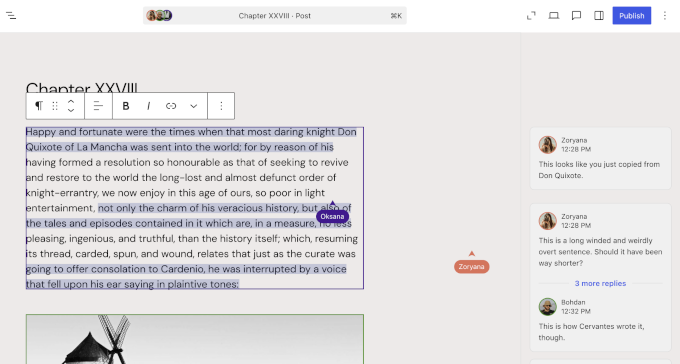
For years, managing a team of writers, editors, and designers in WordPress required external tools such as Google Docs, Slack, or Trello. Version 7.0 aims to pull those collaborative interactions directly into the dashboard. Content teams at agencies, publications, and enterprise sites will feel this change most acutely.
Also included: Notes and Threaded Block Comments
Building on the Notes feature introduced in WordPress 6.9, version 7.0 enhances real-time note syncing, adds a keyboard shortcut for creating new notes, and improves stability throughout the commenting system. Editors can leave notes directly on specific blocks, tag team members, and receive replies, all without leav
ing the editor.
2. Visual Revisions: Compare Page Versions at a Glance
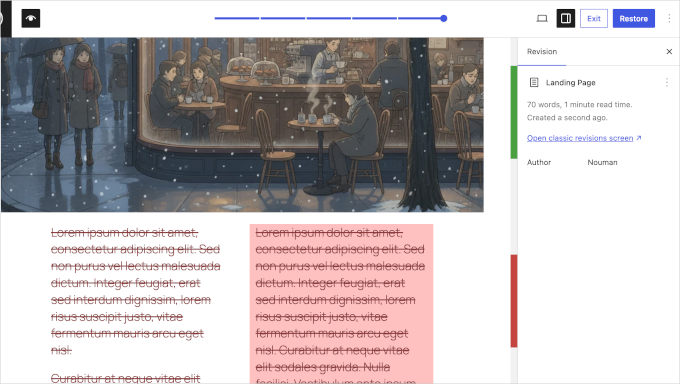
Working with content revisions in older versions of WordPress was largely a text-based experience. WordPress 7.0 transforms this with visual revision comparisons, a feature that lets editors see exactly what changed between twoversions of a post using color-coded overlays directly inside the editor.
The system uses a clear visual language: green outlines for newly added blocks, red for removed blocks, and yellow for blocks where settings were modified. For text content specifically, added text appears in green with underline formatting, removed text appears in red with strikethrough, and format-only changes receive a yellow outline. This makes editorial review dramatically faster and more intuitive, especially for teams managing high-volume content.
3. The WP AI Client: Native AI Infrastructure in Core
Perhaps the most forward-looking addition in WordPress 7.0 is the WP AI Client, a standardized AI infrastructure layer built directly into WordPress Core. This is not a writing assistant or a chatbot plugin. It is a foundational API layer that allows any plugin, theme, or service to leverage AI capabilities from any provider through a single, unified interface.
Built around the php-ai-client package (a shared PHP library for standardized AI service communication), the system ships with three provider packages available in the Plugin Directory: one each for OpenAI, Google, and Anthropic. Developers can write AI-powered features once against this shared interface, and switching between providers becomes a simple configuration change rather than a code rewrite.
The Connectors UI Dashboard
Introduced in Beta 2 and refined through subsequent testing, the Connectors UI is a new dashboard page accessible under Settings > Connectors in wp-admin. It gives site administrators a central place to add, update, and delete external AI connections. The architecture is extensible, meaning plugins and themes can hook into the page and expand its capabilities over time.
- Developer Note: Developers should audit their plugins and themes against the new Web Client AI API and Client Side Abilities API before the April 9 launch to ensure compatibility.
4. New and Improved Blocks
WordPress 7.0 ships with several new core blocks and significant upgrades to existing ones, giving site builders more flexibility without relying on third-party block plugins.
New Blocks
- Icons Block: Add scalable vector icons anywhere in your content, useful for feature lists, callouts, and design elements.
- Breadcrumbs Block: A native breadcrumb trail block for improved site navigation and SEO, with fine-tuning applied through multiple beta cycles.
- Enhanced Heading Block: An updated heading block with expanded formatting and design controls.
Upgraded Existing Blocks
- Cover Block: Now supports video embed backgrounds, allowing video to play directly behind your content without custom CSS.
- Grid Block: A fully responsive grid layout block that adapts intelligently to different screen sizes.
- Navigation Block: Updated to make menu changes easier and more reliable in fewer steps.
- Gallery Block: Caption background blur updated for a more refined visual presentation.
5. Responsive Block Visibility Controls
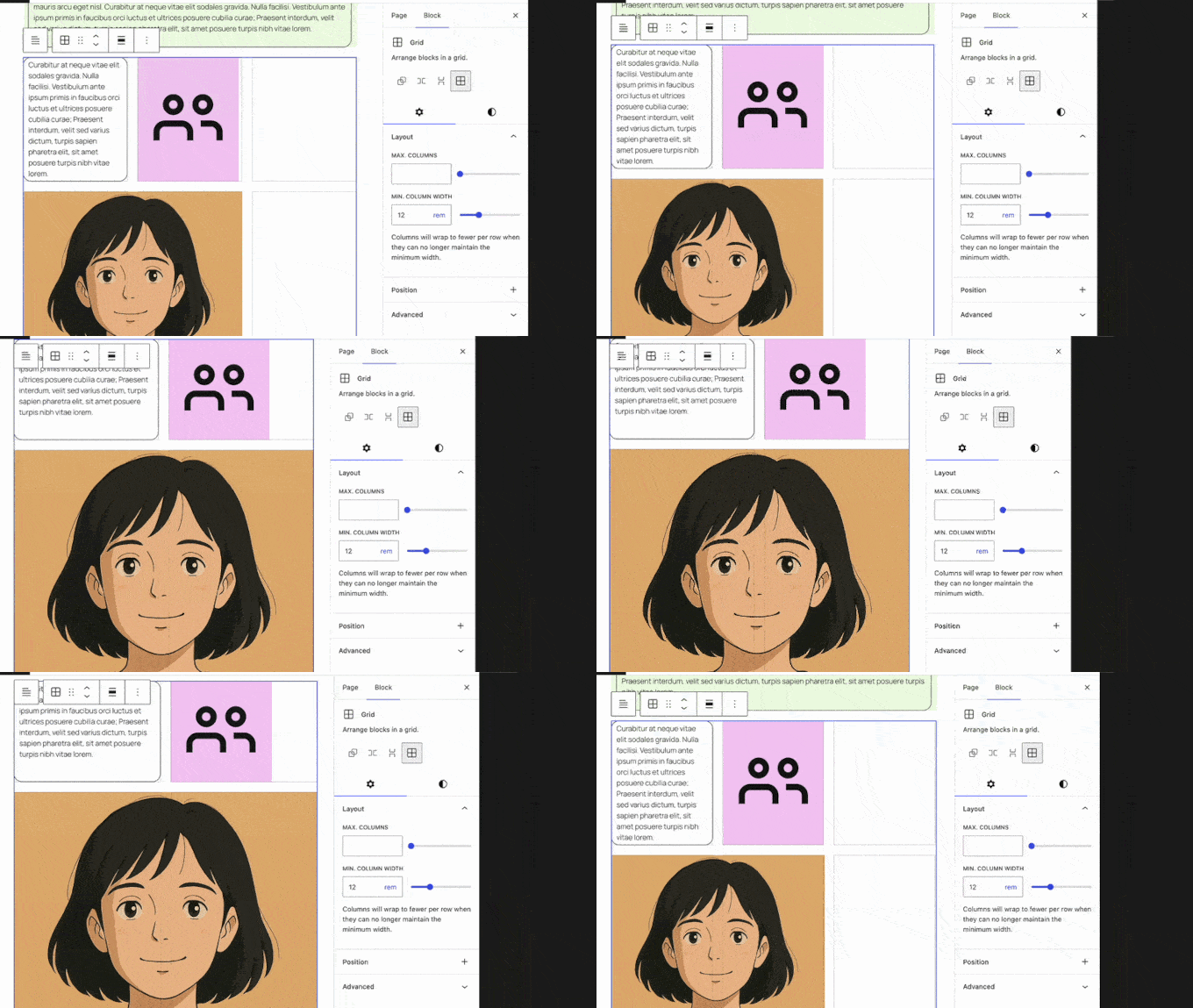
WordPress 7.0 introduces viewport-based block visibility, one of the most-requested features from developers and site builders alike. You can now control whether any individual block appears on mobile devices, tablets, or desktops, directly from the block settings panel in the editor.
This feature, which builds on the foundational visibility controls introduced in WordPress 6.9, means that responsive design decisions that previously required custom CSS or third-party plugins can now be made visually, without writing a single line of code. For designers managing complex page layouts, this is a significant workflow improvement.
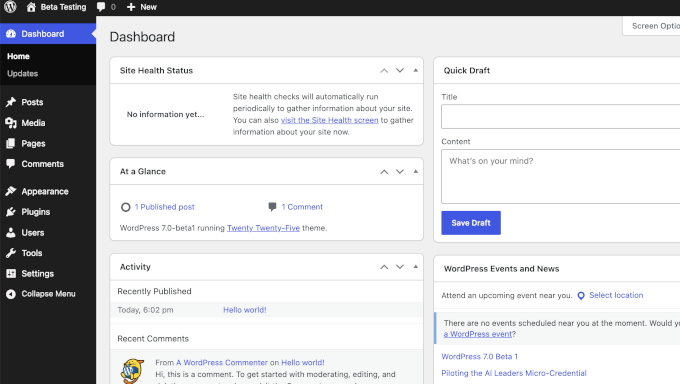
6. Redesigned Admin Dashboard and UI
The wp-admin experience receives its most visible refresh in years with WordPress 7.0. The update includes a fresh default color scheme, a cleaner and more modern looking dashboard interface, and seamless cross-document view transitions that provide visual continuity as you navigate between screens.
7. Font Library for All Themes
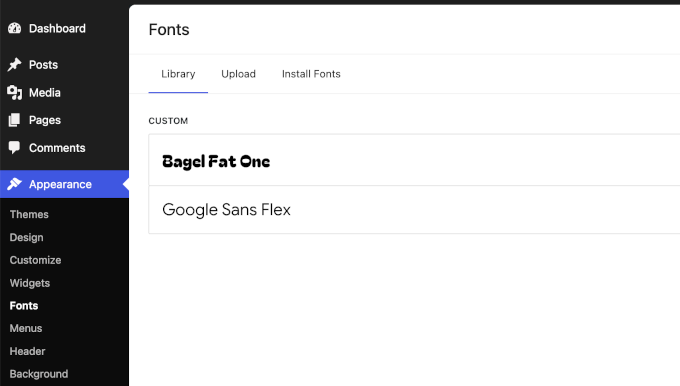
Previously, the Font Library (which allows users to browse, install, and manage custom fonts) was only available for block themes. In WordPress 7.0, this restriction is lifted. The Font Library is now enabled for all themes, meaning every WordPress site, regardless of the theme it runs, gains a centralized font management interface inside the Site Editor.
This is a meaningful quality-of-life improvement for designers who work across a variety of client sites with different theme architectures. No more workarounds or third-party font management plugins for basic typography control.
Technical Changes for Developers
WordPress 7.0 also brings a number of developer-focused changes that require attention before the official launch.
- PHP 7.4 minimum required: WordPress 7.0 raises the minimum PHP version to 7.4. PHP 8.3 or higher is strongly recommended for best performance and security.
- Always-iframed post editor: The post editor will now always run in an iframe, regardless of block API version. Developers with older blocks or global CSS/JavaScript dependencies should review the migration guide.
- PHP-only block registration: Changes to how blocks are registered on the server side require review for plugin developers using custom block types.
- New WP-CLI block commands: The WP-CLI team is shipping a new ‘wp block’ command set for read-only access to block entities, with export capabilities for patterns and templates.
- HtmlRenderer component: A new component in Gutenberg renders HTML as React elements, removing extra wrapping divs from several blocks for more consistent front-end styling.
- Block Bindings updates: Pattern override behavior in Block Bindings has been updated; review your pattern-based implementations for compatibility.
How to Prepare for WordPress 7.0
The April 9 launch date is just weeks away. Here is what you should be doing right now to ensure a smooth transition for your sites and clients.
- Test on a staging environment: Install WordPress 7.0 Beta 5 on a staging site, not production, and walk through your critical pages, plugins, and custom blocks.
- Check your PHP version: Confirm your hosting environment runs PHP 7.4 at a minimum, and upgrade to PHP 8.3 if possible.
- Audit your plugins and themes: Cross-check compatibility against the new AI Client API, Block Bindings changes, and the always-iframed post editor.
- Review your hosting plan: Real-time collaboration features may require additional infrastructure support. Confirm your host is ready.
- Follow Make WordPress Core: The official development blog at make.wordpress.org/core is the most reliable source for last-minute changes and RC announcements.
- Test using WordPress Playground: If you do not have a staging environment, use WordPress Playground for zero-risk browser-based testing of all new features.
Final Thoughts
WordPress 7.0 is the release the community has been building toward for years. Real-time collaboration, native AI infrastructure, responsive design controls, a redesigned admin, and a wealth of new blocks combine to make this the most significant version since Gutenberg arrived in WordPress 5.0 back in 2018.
The turbulence of 2025 is behind us. With a stable contributor base, a focused roadmap, and a release that delivers on long-standing promises, WordPress is entering 2026 with confidence. Whether you manage a single personal blog or a network of enterprise sites, version 7.0 has something meaningful to offer you. Mark April 9, 2026 in your calendar, set up your staging environment today, and get ready to experience the next generation of WordPress.